Co-Located Teams vs Virtual Teams: Differences and Tradeoffs
16 min
· February 9, 2023
Last updated: October 30, 2026
To increase visibility, adaptability, and product quality in software development, 71% of companies in the US have adopted agile methodology and associated frameworks like Scrum. Depending on an organization’s hiring or project implementation needs, an agile team can either be distributed or co-located.
But the real question is, what are the risk-benefits of distributed vs co located agile teams? In this article, we describe the pros and cons of co-location versus distributed teams, as well as tips to help you choose the better option. We also highlight when organizations prefer either of the two engagement models.
Co-located teams work together in the same physical location, such as an office, development center, or shared workspace. Team members can communicate face-to-face, discuss problems in real time, and exchange knowledge through both formal meetings and informal conversations.
This model can be particularly useful for projects that require close supervision, frequent feedback, or intensive collaboration between developers, product managers, and other stakeholders.
Virtual teams collaborate primarily through digital communication and project management tools rather than sharing a physical workspace. Members may work remotely from their homes, coworking spaces, or company offices in different locations.
Distributed teams are a form of virtual team whose members work across multiple geographical locations, often in different cities, countries, or time zones. These teams enable companies to access global talent, expand engineering capacity, and build teams without requiring everyone to relocate.
Although the terms are often used interchangeably, virtual describes how a team collaborates, while distributed emphasizes where its members are located.
Share your team requirements, and we’ll launch a ready-to-deliver team in just 2–4 weeks.
The right model depends on your business priorities, team structure, and project requirements. Here’s how co-located and distributed teams compare across key factors.
| Factor | Co-located teams | Distributed teams |
|---|---|---|
| Communication | Face-to-face discussions and immediate feedback | Digital communication and asynchronous updates |
| Talent access | Primarily tied to a local hiring market | Access to talent across regions and countries |
| Operating costs | Office rent, utilities, and on-site expenses | Lower office overhead, with remote collaboration and infrastructure costs |
| Flexibility | More dependent on office location and schedules | Greater flexibility in work location and staffing |
| Coordination | Easier spontaneous discussions; meetings may still be needed | Requires clear processes, documentation, and planned overlap hours |
| Team cohesion | Informal interaction can strengthen relationships | Requires deliberate efforts to build trust and connection |
| Scalability | Expansion may require additional office space | Teams can grow across locations and talent markets |
| Security | Centralized physical access can simplify some controls | Requires strong identity management, access controls, and security policies |
Co-located teams can be a strong choice for organizations that value direct communication and close collaboration. However, bringing everyone into one location also introduces operational costs and hiring limitations.
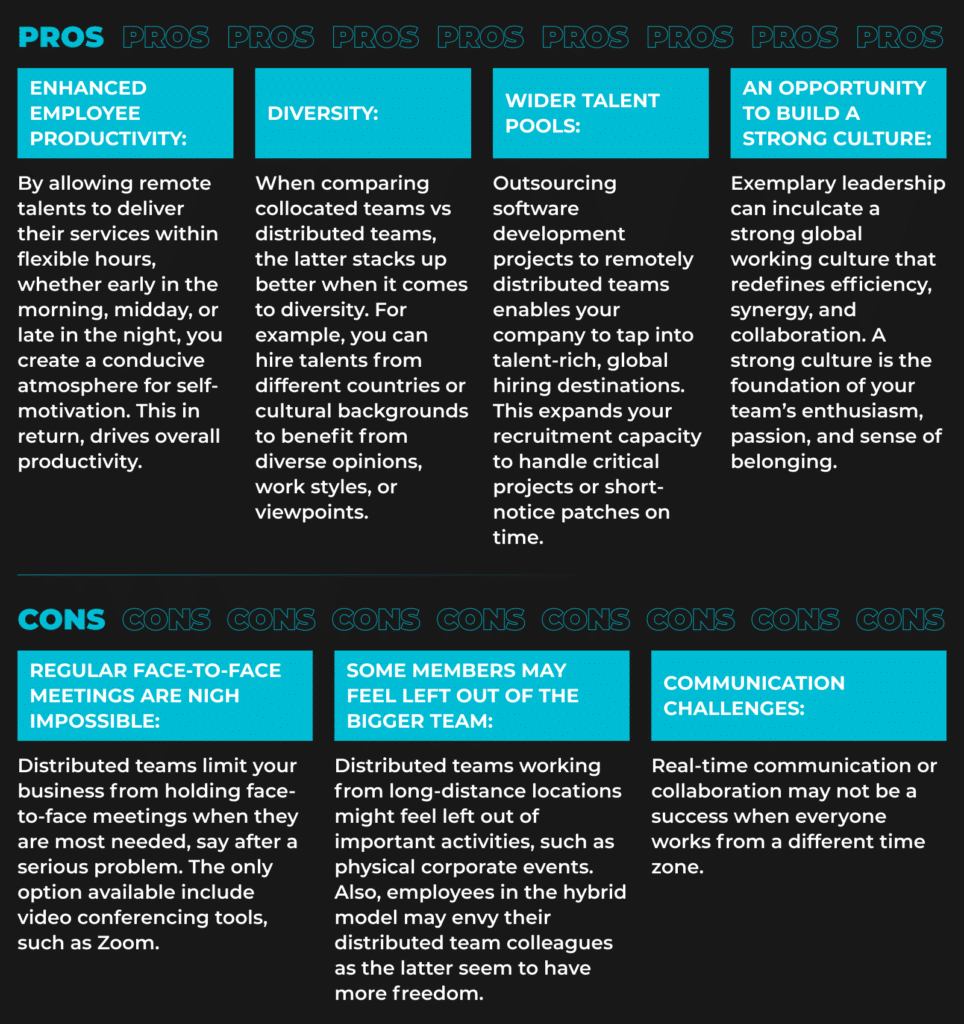
Working in the same location makes it easier for developers to ask questions, review ideas, and resolve blockers without waiting for scheduled meetings. Whiteboard sessions, pair programming, and spontaneous discussions can help teams solve complex problems and share knowledge.
Regular in-person interaction can also strengthen relationships, particularly for newly formed teams that are still establishing their working practices. For startups and R&D centers, this can be useful when product requirements change frequently or technical decisions involve several stakeholders.
The main disadvantages of co-location are the costs and constraints associated with maintaining a shared workspace. Rent, utilities, equipment, and commuting expenses can increase operating costs.
Hiring may also be limited by the availability of specialists in the local market. If the required skills are scarce, a company may need to offer relocation support or spend more time recruiting.
Finally, a shared office does not automatically guarantee productivity. Unnecessary meetings, interruptions, and long commutes can reduce focus, making it important to balance in-person collaboration with individual work.
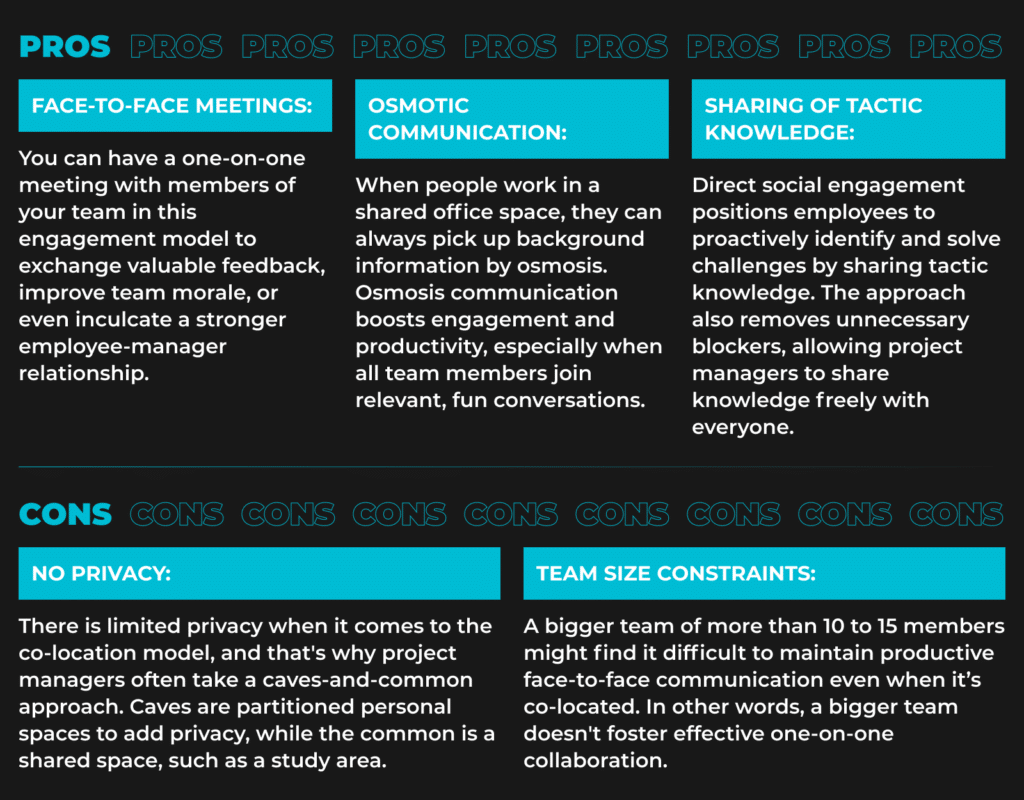
Distributed teams allow companies to build engineering capacity across geographical boundaries. They can be particularly valuable for organizations that need specialized skills or want to expand without colocation establishing a physical office in every location.
Distributed teams give businesses access to a broader pool of software developers, engineers, and technical specialists. Instead of limiting recruitment to one city, companies can search across multiple talent markets to find the right skills and experience.
This approach can also reduce office-related expenses and provide more flexibility when scaling a team. Companies can establish dedicated development teams in different countries while maintaining a shared product roadmap and engineering standards.
For startups, access to international talent can help address local skills shortages. For established businesses, distributed teams can support product development, market expansion, and additional R&D capacity.
Distance can make spontaneous communication more difficult. Different time zones may delay decisions, while unclear responsibilities can lead to duplicated work or missed handoffs.
Remote employees may also experience isolation if teams lack regular interaction and opportunities to build relationships. Without clear documentation, important technical decisions and project updates can remain confined to private conversations or individual knowledge.
To address these challenges, distributed teams need reliable communication tools, documented workflows, clear ownership, and agreed-upon working hours for collaboration.
Agile principles emphasize iterative delivery, customer feedback, collaboration, and continuous improvement. Both co-located and distributed teams can apply these principles, but they need different practices to make collaboration effective.
Co-located teams can use daily standups, in-person sprint planning, and retrospective meetings to keep everyone aligned. Developers can work together on complex tasks through pair programming and resolve technical questions in real time.
Frequent face-to-face interaction can shorten feedback loops, but teams should still document decisions and protect time for focused work. Physical proximity alone does not guarantee effective agile delivery.
Distributed agile teams rely on shared task boards, digital documentation, video calls, and messaging platforms to coordinate work. Asynchronous updates help team members in different time zones stay informed without requiring everyone to attend every meeting.
Teams can also establish core overlap hours for sprint planning, technical discussions, and urgent decisions. Clear acceptance criteria, documented architecture decisions, and regular demonstrations help maintain visibility into progress.
The key is to adapt agile practices to the team’s working environment rather than trying to replicate every in-person interaction online.
Location influences more than office expenses. It affects how quickly teams exchange information, resolve blockers, and make decisions.
Co-located teams may spend less time arranging discussions or clarifying misunderstandings. However, office interruptions, commuting, and frequent meetings can create hidden productivity costs.
Distributed teams may save on office expenses and access specialists who are unavailable locally. At the same time, time-zone differences, unclear documentation, and poorly managed handoffs can increase coordination costs.
To evaluate the true cost of either model, businesses should consider the full picture: salaries, office or remote-work infrastructure, recruitment, onboarding, management, communication, and delays caused by coordination. The most cost-effective option is the one that supports reliable delivery without creating unnecessary operational overhead.
Choosing between co-located and distributed teams requires an understanding of your project’s goals, collaboration needs, budget, and available talent.
Co-location can work well when teams need frequent in-person interaction, close access to equipment, or intensive collaboration on complex and sensitive projects.
It may also suit early-stage teams that are establishing their product direction, engineering practices, and working relationships. Having employees in one location can make it easier to align priorities and resolve issues quickly.
However, businesses should assess whether physical proximity is genuinely necessary for the work rather than treating office attendance as a default requirement.
Virtual and distributed teams are often a better fit when local hiring cannot meet demand, specialist skills are scarce, or a business needs to expand engineering capacity across markets.
This model can help startups and established companies recruit internationally, build dedicated development teams, and reduce dependence on a single local talent pool.
Successful distributed delivery requires clear accountability, effective onboarding, strong security practices, and communication processes that support collaboration across locations.
A hybrid team combines in-person collaboration with remote work. Depending on the organization, employees may work remotely most of the time and meet periodically, or different team members may follow different location arrangements.
A hybrid approach can balance the advantages of both models. Developers can work remotely on tasks that require concentration while meeting in person for workshops, planning sessions, onboarding, or important product decisions.
To make this arrangement effective, companies should establish clear expectations about office attendance, meeting schedules, documentation, and remote participation. In-person collaboration should have a defined purpose rather than simply requiring employees to commute.
Hybrid work can be especially useful for growing engineering organizations that want access to global talent while maintaining opportunities for face-to-face interaction.
Choosing between co-located teams vs virtual teams requires more than deciding whether employees should work in an office or remotely. Businesses also need to consider communication, security, management capacity, employee preferences, and total operating costs.
Use these five factors to determine which setup best supports your software development goals.
Trust and security are essential in both co-located and distributed teams. Working in close physical proximity can make face-to-face supervision easier, but it does not automatically protect company data or prevent security incidents. Similarly, virtual teams can work securely when the right policies and technical controls are in place.
Before choosing a setup, evaluate how your organization manages access to source code, development environments, customer information, and other sensitive assets.
Consider the following safeguards:
The best choice depends on your security requirements, regulatory obligations, and ability to enforce consistent policies—not simply on where employees work.
Effective collaboration depends on how well team members share information, document decisions, and resolve blockers. Physical proximity can make spontaneous conversations easier, while distributed teams need deliberate communication practices to avoid delays.
For co-located teams, informal discussions and in-person meetings can speed up feedback. However, important decisions made in hallway conversations can leave other stakeholders without the context they need.
Virtual and distributed teams benefit from a combination of synchronous and asynchronous communication. Shared project boards, written updates, technical documentation, and recorded decisions help employees stay aligned without requiring everyone to be online simultaneously.
Before selecting a model, establish:
A clear communication system helps reduce coordination costs and makes collaboration less dependent on physical proximity.
Your organization’s size matters, but team dependencies and management maturity are equally important.
Early-stage startups may benefit from a small co-located team when founders, product managers, and engineers need to make frequent decisions together. However, a distributed setup may be more practical if the required specialists are unavailable locally or the budget does not support a shared office.
Larger organizations often have the processes, documentation, and management capacity needed to coordinate distributed engineering teams across several locations. Still, a larger company may struggle with virtual collaboration if responsibilities are unclear or departments operate in silos.
Work culture influences how employees communicate, make decisions, share knowledge, and balance professional responsibilities. The right setup should support these behaviors rather than impose unnecessary constraints.
Some employees value the social interaction and clear separation between work and home that an office can provide. Others prioritize flexibility, autonomy, and the ability to work from different locations.
Distributed teams can support employees across geographical regions and expand access to diverse talent. However, companies must make an intentional effort to include remote employees in discussions, recognition, onboarding, and career development.
Consider asking your team about its preferences and assessing how different working arrangements affect engagement and collaboration. Avoid assuming that everyone is more productive in an office or that every employee prefers remote work.
A hybrid model may be the best option if employees value flexibility but still need regular in-person interaction. The goal is to create a work environment that supports inclusion, accountability, and effective collaboration.
The financial difference between co-located and distributed teams extends beyond office rent. To make a sound decision, compare the total cost of operating each model with the delivery outcomes it produces.
For co-located teams, account for:
For distributed teams, consider:
Distributed work can reduce office overhead and expand access to specialists, but those savings should be weighed against the costs of communication, management, and international employment arrangements.
Compare the estimated total cost with measurable outcomes such as delivery speed, product quality, employee retention, and the ability to fill critical roles. The most economical model is the one that meets your business needs without creating avoidable operational costs.
Your initial team setup does not have to remain permanent. As your company grows, product requirements change, or hiring needs evolve, you may need to move from co-location to virtual work—or introduce more in-person collaboration into a distributed team.
A successful transition requires more than changing office attendance rules. It involves adapting workflows, communication expectations, management practices, and the tools employees use to collaborate.
Before changing your team’s working arrangement, identify what is not working in the current model. For example, your team may be struggling to recruit specialized engineers locally, spending too much on office space, or experiencing delays because employees in different locations lack shared working hours.
Use these steps to plan the transition:
For example, a company moving from co-located to distributed work could begin by documenting technical decisions and introducing asynchronous sprint updates. It could then assess whether handoffs become more efficient and whether developers can maintain delivery quality without additional meetings.
The same principle applies when a distributed team introduces regular office days or in-person planning sessions. Review whether the additional interaction improves collaboration enough to justify the associated time and expense.
Building an engineering team involves more than deciding where people work. Businesses must also determine how to recruit specialists, structure the team, manage employment arrangements, and maintain consistent delivery across locations.
Newxel helps businesses access engineering talent across international markets, including Ukraine, Poland, Bulgaria, and other European locations. This approach can help organizations address local talent shortages and build engineering capacity around their product requirements.
When evaluating an international hiring partner, consider the following questions:
It is also important to distinguish between team location and the engagement model. A distributed team can consist of your own employees working remotely, engineers employed through an international employment arrangement, or specialists provided by an external partner. A co-located team can likewise include employees and external specialists working together at the same site.
These arrangements have different implications for control, employment responsibilities, costs, and management. Choose the structure that fits your operational needs rather than assuming that distributed work necessarily means outsourcing.

Explore how Newxel helped Renesas to turn a simple staffing request into an R&D center and strategic partnership.
If you’re planning to expand your engineering capacity, explore Newxel’s website to learn more about its approach to building international development teams.
The choice between co-located teams vs virtual teams depends on your business priorities, collaboration requirements, security needs, and access to talent. Co-location can support immediate feedback and informal knowledge sharing, while distributed teams offer greater geographical flexibility and access to a wider talent pool. Hybrid arrangements can combine the benefits of both.
When comparing co-located vs distributed teams, look beyond location alone. Evaluate total operating costs, communication practices, management maturity, and the needs of your employees. Establish clear processes, measure delivery outcomes, and remain open to changing your approach as your organization evolves.