AI Coding Agents Are Changing Software Development: What Happens to Engineering Teams in 2027?
9 min
· October 15, 2026
Last updated: October 15, 2026
A few years ago, AI in a developer’s day meant smarter autocomplete. Today a developer can describe a refactor in plain language, hand it to an agent, step into a meeting, and return to a pull request waiting for review.
This shift is already changing how engineering teams work, how productivity is measured, and which skills companies need to hire for. But faster code generation doesn’t automatically translate into faster delivery. Code quality, testing, security, and human oversight still matter.
So, what will software development teams look like in 2027? In this article, we explore the latest research on AI coding agent adoption, compare leading tools such as Claude Code, OpenAI Codex, GitHub Copilot, and Cursor, and examine real-world implementations and case studies.
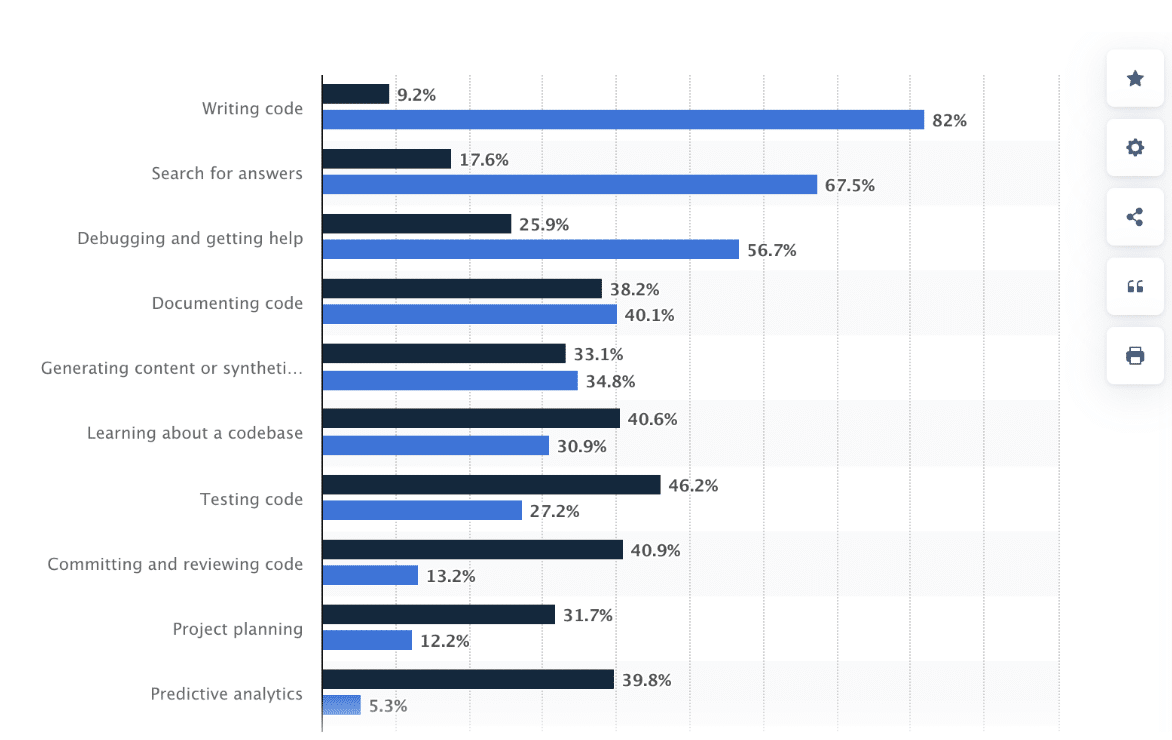
The numbers tell a clear story. According to the Stack Overflow Developer Survey, around 82 percent of developers reported using AI tools for writing code. Searching for answers came second, with around 68 percent. In other words, AI has already become a normal part of the daily workflow for the majority of developers worldwide.
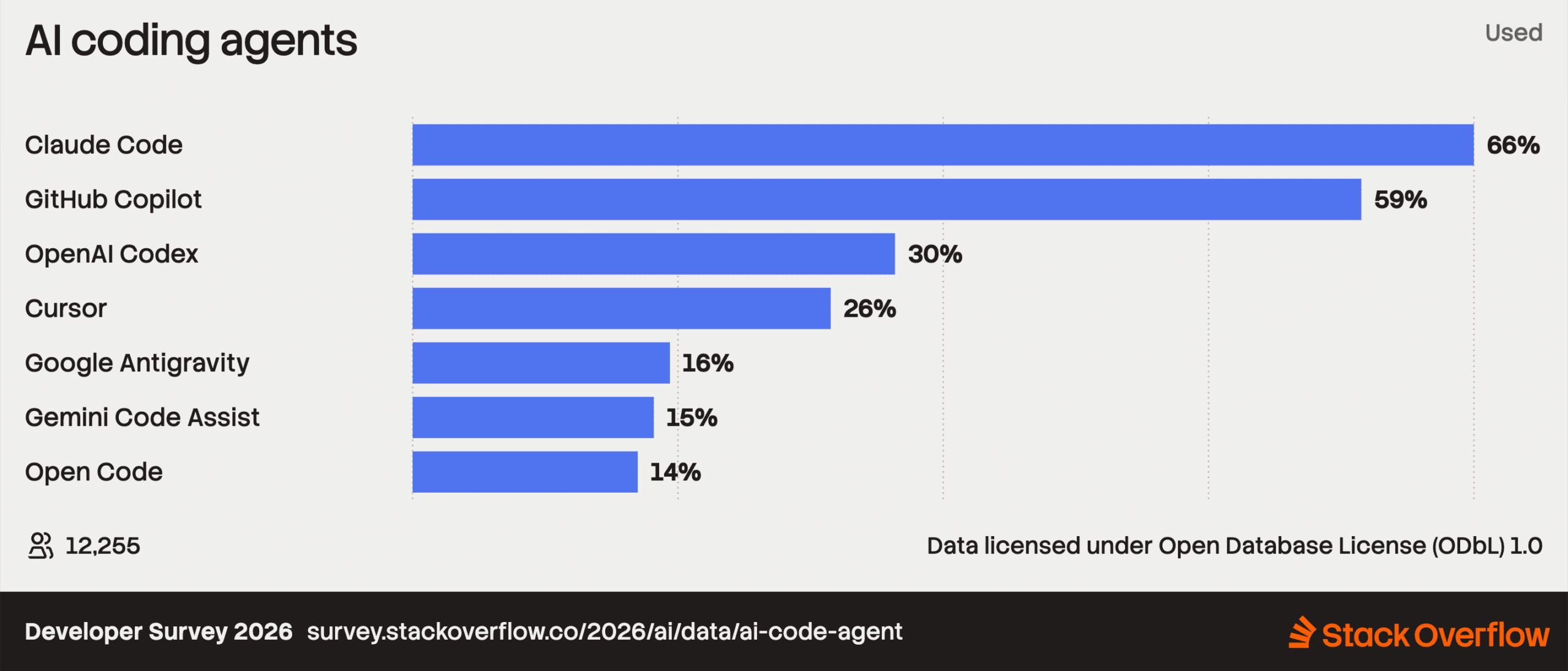
Claude Code (66%) and GitHub Copilot (59%) are the clear leaders.
“AI has the potential to reshape the entire software and product development life cycle, but realizing that potential requires a foundational change to workflows, roles, and ownership”, Stack Overflow CEO Prashanth Chandrasekar interview with McKinsey.
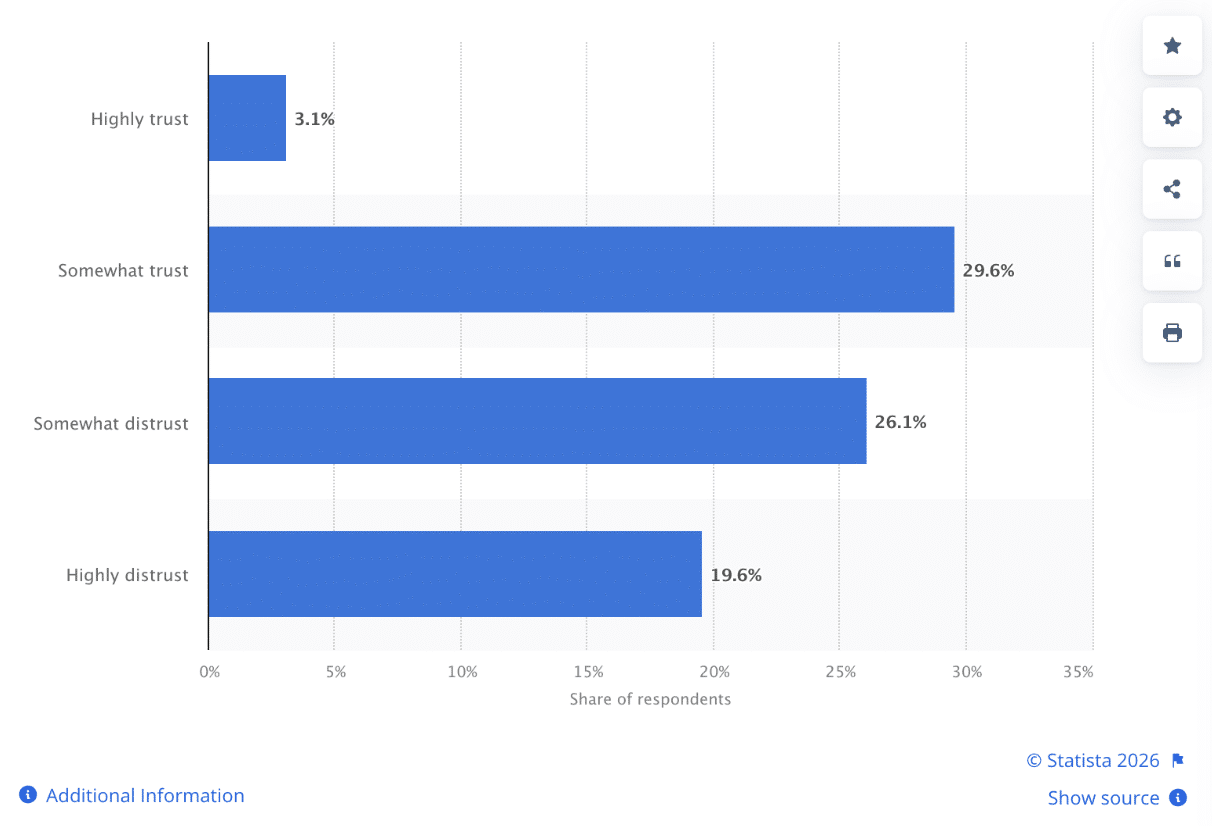
The newer wave is about agents. Among AI coding agents, Claude Code (66%) and GitHub Copilot (59%) are the clear leaders in usage. Developers are also asking harder questions about accuracy, and the Statista data on how developers rate the accuracy of AI tools in their workflow shows why: the technology is widely used, and trust is still being earned.
Stack Overflow CEO Prashanth Chandrasekar put the bigger picture well in an interview with McKinsey: “AI has the potential to reshape the entire software and product development life cycle, but realizing that potential requires a foundational change to workflows, roles, and ownership.” The key words there are workflows, roles and ownership. Tools are the easy part. Team structure is where the real work begins.
Most popular uses of AI in the development workflow among developers worldwide
Source: Statista
Accuracy of artificial intelligence (AI) tools in the development workflow according to developers worldwide as of 2025
Source: Statista
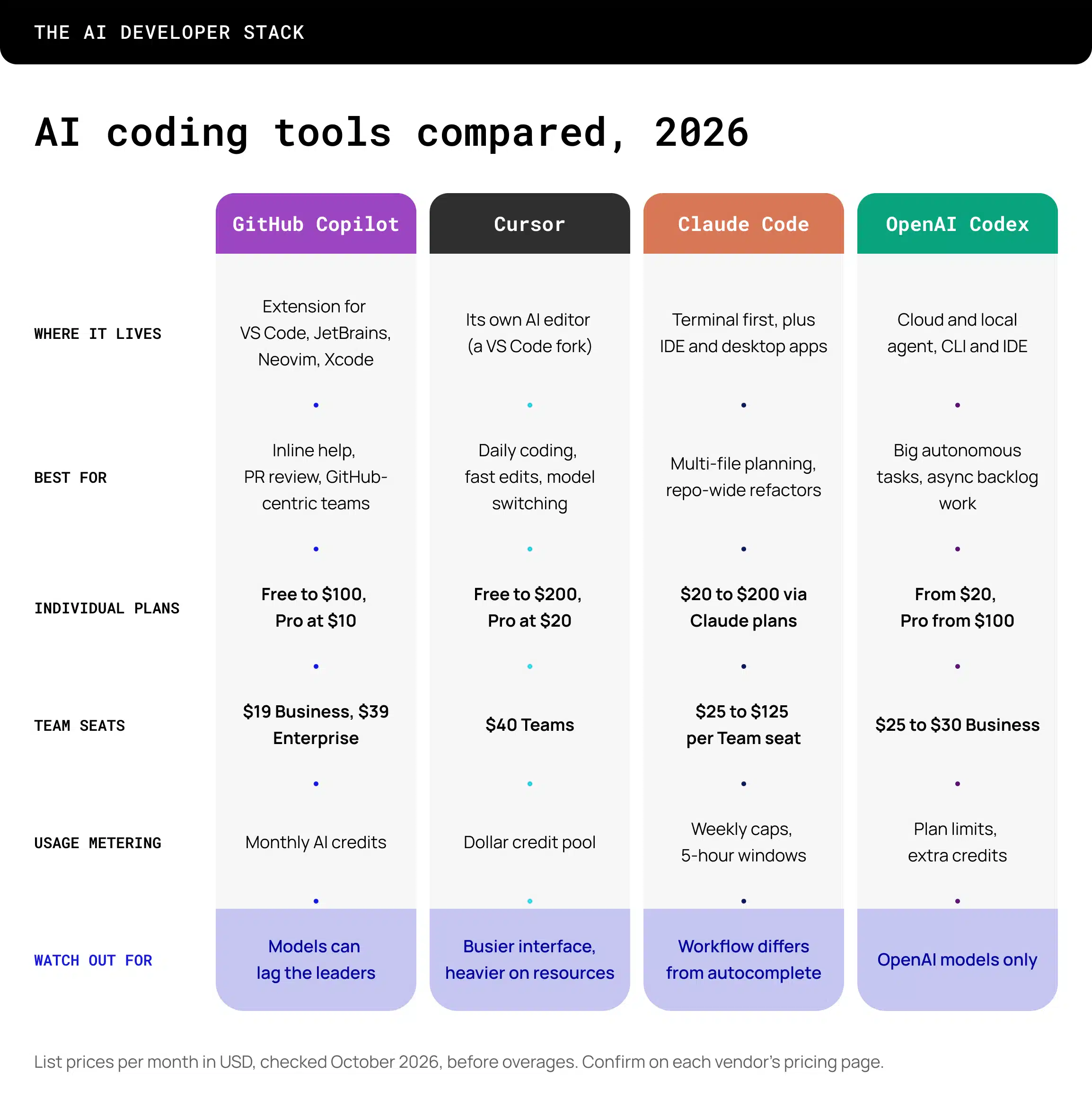
Most engineering teams no longer pick a single AI tool. The tools now overlap on chat, editing, terminal commands, background agents and pull requests, so the useful question is where each one fits in the workflow. One review of the four main players puts it plainly: they now overlap across chat, code editing, terminal commands, background agents, pull requests, and review.
Claude Code started as a terminal tool, but that description is outdated. It now runs in VS Code, JetBrains, a desktop app, and a browser-based IDE. Reviewers consistently point to the same strengths: complex, multi-file planning and terminal-heavy work. Its SDK also lets it plug into CI/CD pipelines and automation scripts. The common complaint is the learning curve. Developers used to tools that predict the next edit as they type often find the workflow feels like a different sport.
Codex is the pick for delegation. One comparison calls it the fire-and-forget choice for big, sandboxed refactors, and it tends to do well on larger autonomous tasks. It suits teams already built around OpenAI models and asynchronous task queues. The trade-off is model lock-in, since it runs on OpenAI models only.
Copilot has the biggest installed base and the easiest path through procurement. For a large team already on GitHub Enterprise, it wins on procurement and central management. It also covers the widest range of editors, and its issue-to-PR and code review features sit inside the GitHub workflow where teams already work. Developers who focus on raw agent capability sometimes rate it lower, and one review notes the underlying models tend to lag.
Cursor is where many developers spend their day. It is a VS Code fork, so setup is quick, and its main structural advantage is hybrid model access, letting you switch between model families mid-session. It is strong at inline editing and visual feedback loops. The downsides reviewers mention are a busier workspace and higher local resource use.
Read also:
Why Big Tech Is Cutting Jobs While Investing in AI
Pairing is the norm. A typical setup is Cursor for daily coding, Claude Code for complex refactoring sessions, and Copilot for quick suggestions in JetBrains or Xcode where Cursor is not available. Another common split: Cursor handles the daily IDE and visual feedback loop, while Claude Code handles batch edits and cross-repo work.
How to choose?
With agents handling more of the typing, the shape of an engineer’s day shifts. Here are the changes we expect to see most clearly.
More time on specification and review
Writing a clear task description for an agent is a real skill, and reviewing agent output carefully is another. Engineers who can break a problem into well-defined pieces and judge the result quickly will deliver the most value.
Senior judgment gets more valuable
Agents produce code at speed, and someone has to decide whether that code fits the architecture, the security model and the long-term plan. That decision needs experience, so strong mid-level and senior engineers become the backbone of an AI-assisted team.
Process catches up with tooling
Code review queues, CI/CD pipelines, testing standards and ownership rules all feel the pressure when output volume grows. Teams that update these early avoid a bottleneck later.
Tool choice becomes a team decision
Since most teams run two or three tools, someone needs to own the stack, set guidelines for usage and keep costs and security under control.
Share your team requirements, and we’ll launch a ready-to-deliver team in just 2–4 weeks.
AI could cost more than a developer. Gartner predicts that AI coding costs will exceed the average developer’s salary by 2028 as token consumption increases and vendors shift toward usage-based pricing.
“Organizations are rapidly moving from experimentation to scaled deployment of AI coding agents, but many are underestimating the financial impact of rising token consumption,” said Nitish Tyagi, Senior Principal Analyst at Gartner.
Without visibility into token usage across development tasks, organizations risk budget overruns and may struggle to measure whether AI investments deliver sufficient value. As developers prioritize speed and convenience, companies need clear governance and cost controls to prevent spending from growing faster than productivity.
Jellyfish’s H1 2026 research shows how quickly AI coding expenses have grown. At a typical company, monthly AI spending per user increased 16-fold in ten months, from $5 to $81 between August 2025 and May 2026.
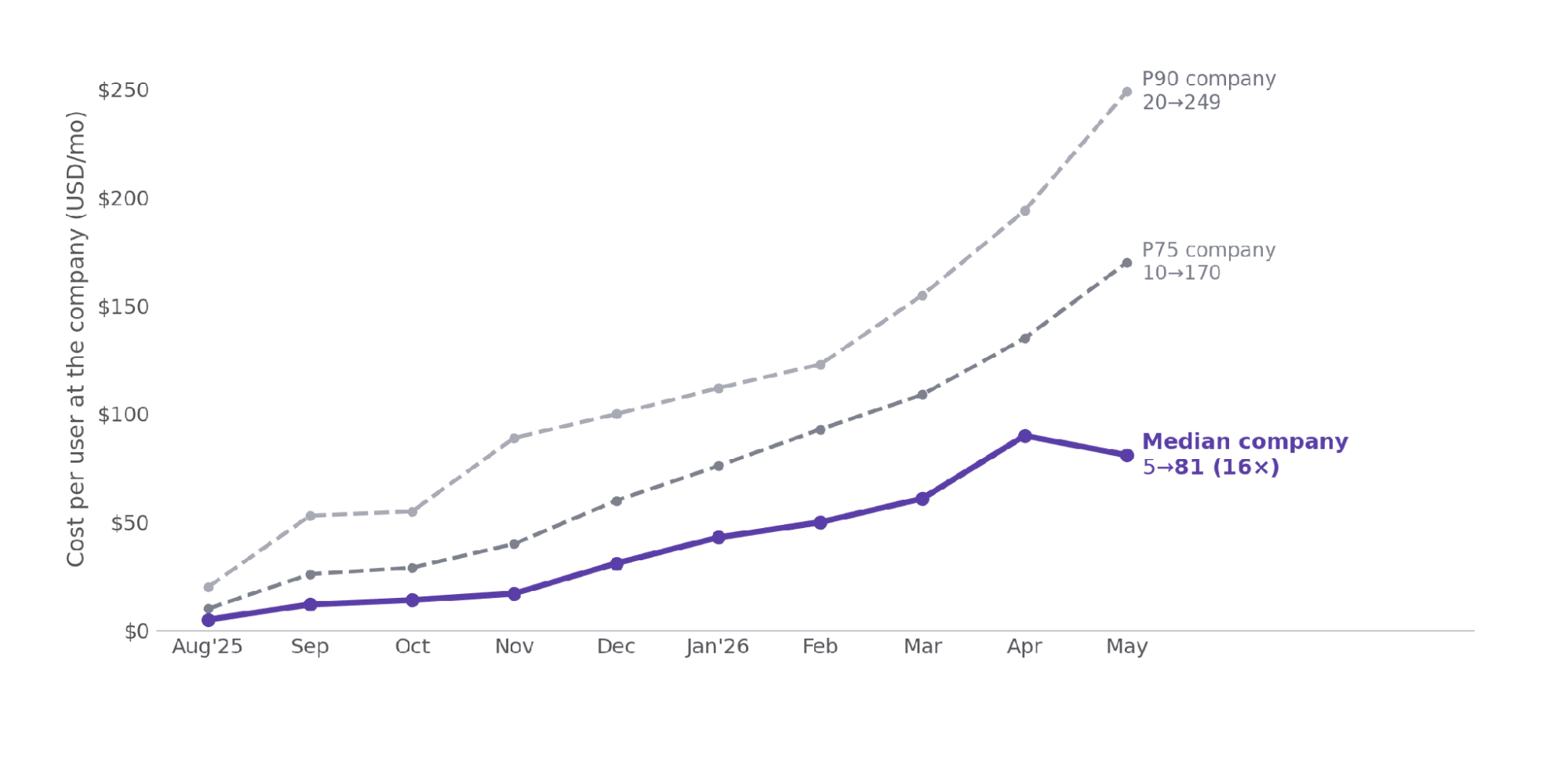
Illustrative comparison using Jellyfish’s reported AI spending figures and its stated US junior-developer salary benchmark.
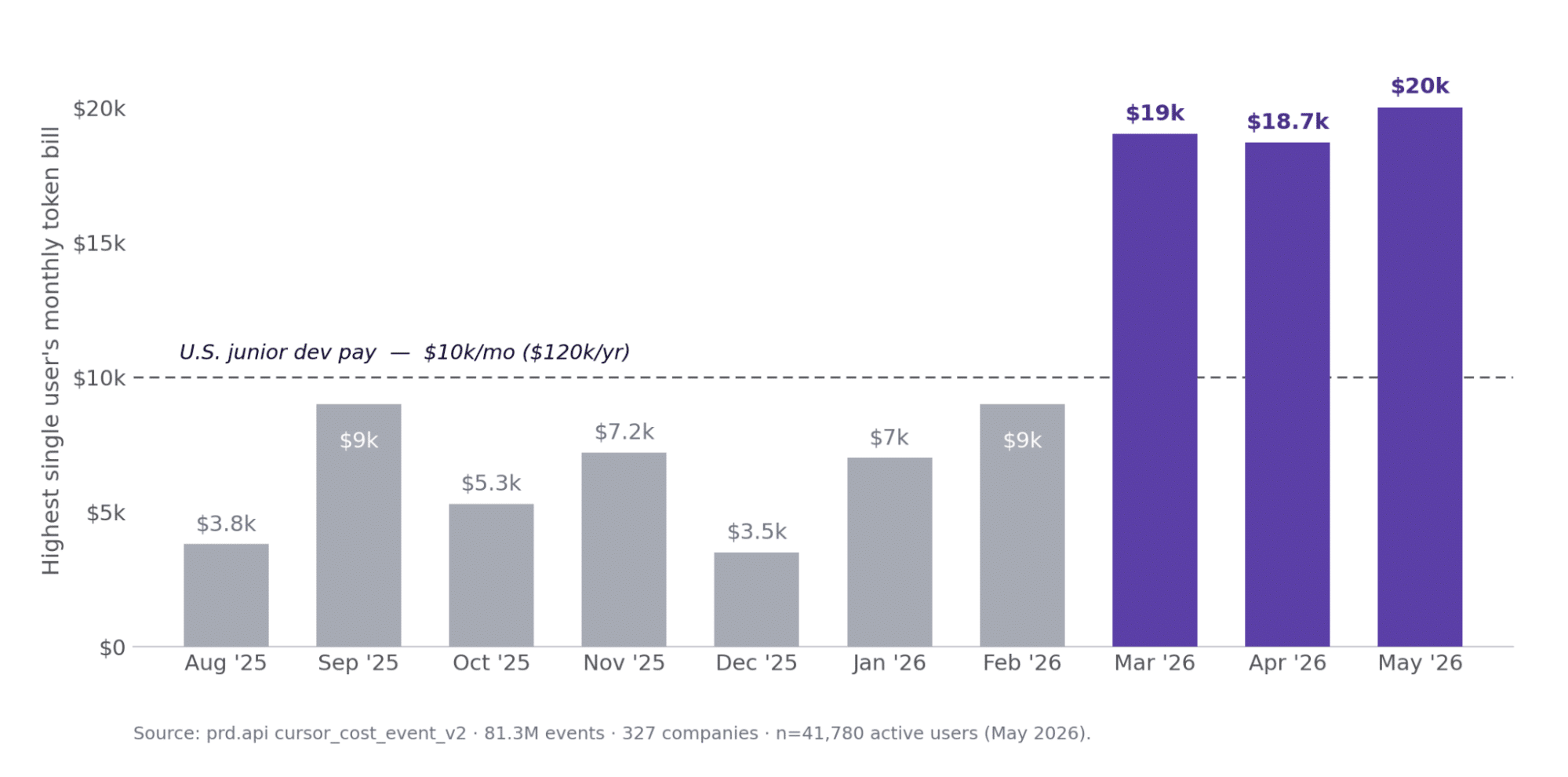
In May 2026, average monthly AI spending reached $248 per user, compared with a median below $100 for most users, while the top 1% spent as much as $2,452. In extreme cases, a single user’s monthly AI bill even matched or exceeded a US junior developer’s monthly salary of approximately $12,500.
Also The Hidden Costs of Coding With Generative AI, by Edward Anderson, Geoffrey Parker, and Burcu Tan, published by MIT tell that the key argument is that AI can improve coding speed in controlled tasks while increasing technical debt when generated code is introduced carelessly into complex, existing systems.
Key takeaways:
If agents change what engineers do, they also change who you want on your team. The profile that stands out in 2027 is an engineer with solid fundamentals, good communication and the curiosity to work comfortably with AI tools every day.
This is where the way you build your team matters. Many companies use IT staff augmentation to add specialists who already work well with modern AI tooling, and others set up an offshore development center (ODC) or a dedicated development team to scale with a stable, long-term group. Eastern Europe remains a strong region for this, with a deep pool of experienced engineers, a strong engineering culture and convenient time zone overlap with European and North American teams.
Whichever model you choose, a few questions are worth asking when you build or extend a team:
AI coding agents are already part of everyday development, and the conversation is moving from “should we use them” to “how do we organize around them.” The strongest teams in 2027 will combine the right mix of tools with experienced engineers, clear review practices and a workflow that was designed with agents in mind.
If you are planning to grow your engineering capacity and want people who are ready to work this way, the Newxel team is happy to talk through the options.